
Redirectinator
A URL redirect monitoring spreadsheet for technical SEO migrations and replatforming projects.
Download the Redirectinator Google Sheet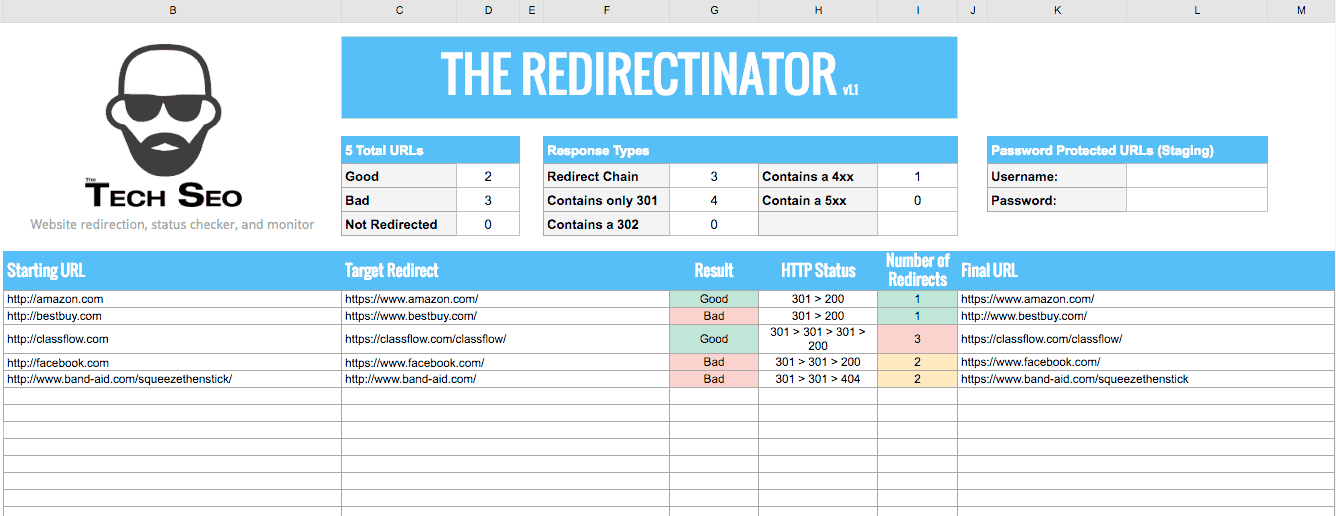
After the mapping is sent to the client, it is a waiting game to get 301 redirects implemented. Dev teams do not always notify you when redirects go live or get removed. The Redirectinator helps monitor future and legacy redirect mappings.
How the Redirectinator works
The spreadsheet is easy to use since only the first two columns are needed. The last four columns auto-fill with redirect mapping data.
- Starting URL: the URL you want redirected
- Target URL: the destination of the redirect
- Result: whether the starting URL matched the final URL
- HTTP Status: redirect chain, 4xx, or 5xx errors
- Number of Redirects: count of hops in the chain
- Final URL: where the starting URL ends up
Check staging server redirects
If your staging server is behind authentication, enter the username and password in the top right of the sheet to check redirects on staging. Great for replatforming and redesign QA.
Sheet limitations
Very large redirect lists can slow Google Sheets and the sites being checked. Split your list across multiple copies of the Redirectinator if needed.